A useful ClickBank landing page example shows what an affiliate can explain before handing a visitor to the seller. Start with the reader's question, give a bounded answer, and label the next destination. The worked example below is an invented drawing-course scenario for studying page structure. It is not a recommendation, a live offer, or a report of conversion results.
Choose the page you actually control
ClickBank's affiliate landing-page guide describes a bridge between a traffic source and a seller's pitch page. It also distinguishes an opt-in page that collects contact details. Those are different jobs. Before copying a layout, decide whether the next click opens the seller's offer or submits information to you.
This example uses a direct handoff. It contains no signup form, payment form, account creation, or checkout. A reader should be able to learn something useful without clicking the offer. A separate opt-in route needs its own promised resource, delivery process, privacy information, and recovery message. Adding a decorative email field to this example would leave those jobs unfinished.
Use the editable review template to choose a route and record the missing decisions. Its output is a planning brief. It does not generate a tracking link, check a merchant's terms, verify a claim, or certify a page as ready to publish.
Worked example: a beginner drawing-course bridge
Imagine that an affiliate is considering a digital drawing course listed by a seller. The affiliate has read the seller's current description but has not taken the course. The page can help visitors identify what to inspect. It cannot honestly present a personal review, student result, or independent test.
Headline: “Considering a beginner drawing course? Check these three things first.” This sets an inspection task. It makes no promise about artistic progress, earnings, or the time needed to learn.
Opening: “Before choosing a course, compare its required equipment, lesson format, and access conditions with the way you plan to practise.” This gives visitors a useful frame even if they decide to leave. Replace the general questions with verified offer details only when there is evidence to support them.
Relationship note: If the page uses a commission link, explain that relationship in plain language beside the recommendation. A possible sentence is “I may earn a commission if you buy through this link.” Use wording that accurately describes the actual arrangement. This is an editorial example, not a jurisdiction-specific legal compliance assessment.
Useful content: Put three short inspection blocks before the button. Ask which materials are needed, whether lessons are recorded or scheduled, and what the seller says about access. Link each factual statement to the relevant seller source in your working record. If the answer cannot be verified, retain it as a question for the reader rather than silently turning it into a benefit.
Limit: “I have not taken this course. This page explains what to inspect in the seller's description.” This boundary matters more than a polished star rating. Do not insert an invented score, stock customer quote, or photographed person presented as a student.
Button: “View course details on the seller's page.” A short line below can say “You will leave this site; check the seller's current price and conditions there.” The destination must match those words. Do not label this button “Download your course” when it only opens a sales page.
Read the anatomy before changing the design
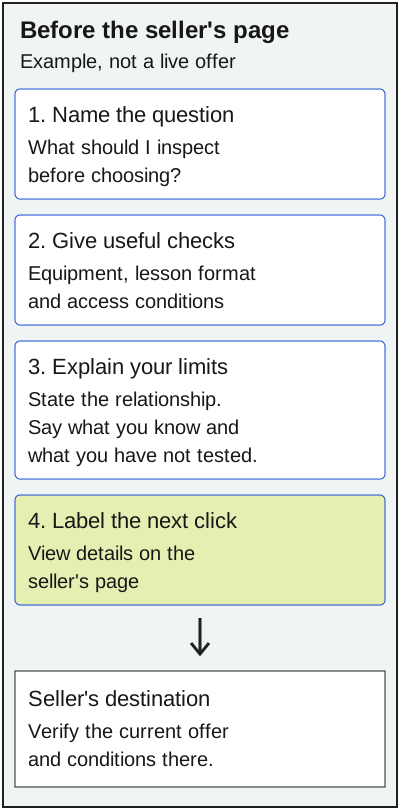
The diagram separates what the affiliate controls from what the visitor must verify with the seller. It is a content model, not a screenshot of a successful campaign. Keep the distinction visible when selecting a template: the affiliate explains why the visit may be useful; the seller describes the offer and handles the next transaction.
Notice that the worked page does not repeat a whole sales letter. It gives the visitor an inspection method and an honest handoff. A page that merely paraphrases the seller's headline adds little help. A page that invents proof creates a different problem. Write the smallest useful explanation you can support, then let the seller's current details answer the commercial questions.
Adapt the example without inventing proof
Replace the drawing topic with the actual reader task. For a software tutorial, equipment might become operating-system requirements. For a craft course, it might become materials and workspace. Keep the questions specific enough that a visitor can use them, but avoid guessing at features that the seller has not stated.
Build a source record while writing. Save the seller URL, the date you checked it, the exact feature being described, and the limits of your knowledge. An official product description supports a statement about what the seller says. It does not establish that the product works for every buyer. A demonstration may explain an interface without proving a customer's future outcome.
If you have genuine firsthand experience, describe the task, version, conditions, and observed limits. If you do not, keep the page a researched overview. The heading “review” does not supply experience that the author lacks. Our guide to showing results without promising the same outcome explains the broader proof problem.
Use the template as an editorial handoff
Choose “Seller handoff” in the tool for the example above. Enter a plain topic and mark each review item only after checking it. The generated brief lists the route, the example button label, and the unresolved topics. “All review items recorded” means that you selected the boxes; it is not an independent verification result.
Choose “Resource opt-in” only when you control an actual resource and its delivery. The tool changes the suggested action to a resource request and adds a reminder to review delivery and privacy. It does not send email, store visitor data, or build a mailing list. If you only wanted a seller link, keep the direct route and leave collection out of the design.
You can edit the brief after generation. Copy it into your editorial record and assign the unresolved items to a named reviewer. Regenerate it after changing the route or checkboxes. The page has no persistent storage, so keep a copy before closing the tab. No mathematical calculation or revenue forecast is involved.
Check the destination before release
ClickBank's guide warns that link shortening or masking may interfere with tracking and recommends testing links. Treat that as a reason to inspect the real route, not as proof that a particular link will attribute a sale. Use the link supplied through the legitimate affiliate workflow and the seller's applicable permissions. This article supplies no campaign authorization.
Follow the actual button in a controlled check. Record the final destination, whether it is the expected seller, and whether the page still matches your description. A successful HTTP response establishes access; it does not prove attribution, permission to advertise, or commercial viability. Stop the release if the destination is unexpected or the offer has changed.
Then check the page at a phone width. Read the relationship note, inspection blocks, limitation, and button in order. Confirm that the button remains usable and that no stock photo suggests a customer result. The photograph accompanying this guide depicts paper website planning; it is not evidence about the hypothetical course.
Keep the bridge honest after launch
Record a review date for the offer and the next-click wording. Revisit the page when the seller changes features, access, price, or destination. Remove stale assertions rather than adding an “updated” label to unchanged copy. If you cannot verify an important detail, keep the page on hold.
For general page sequence and an editable code example, see putting proof before commitment. That guide addresses layout implementation. This example addresses the affiliate-to-seller boundary. Neither provides an expected conversion rate, search-volume estimate, or promise of profit.